Logiciel de présélection RH pour petites entreprises : que vérifier en 2026
La plupart des outils de présélection RH ont été conçus pour les grandes équipes. Les 4 vérifications qui comptent vraiment pour une petite entreprise en 2026, pour arrêter de surpayer un logiciel qui n'a pas été pensé pour vous.
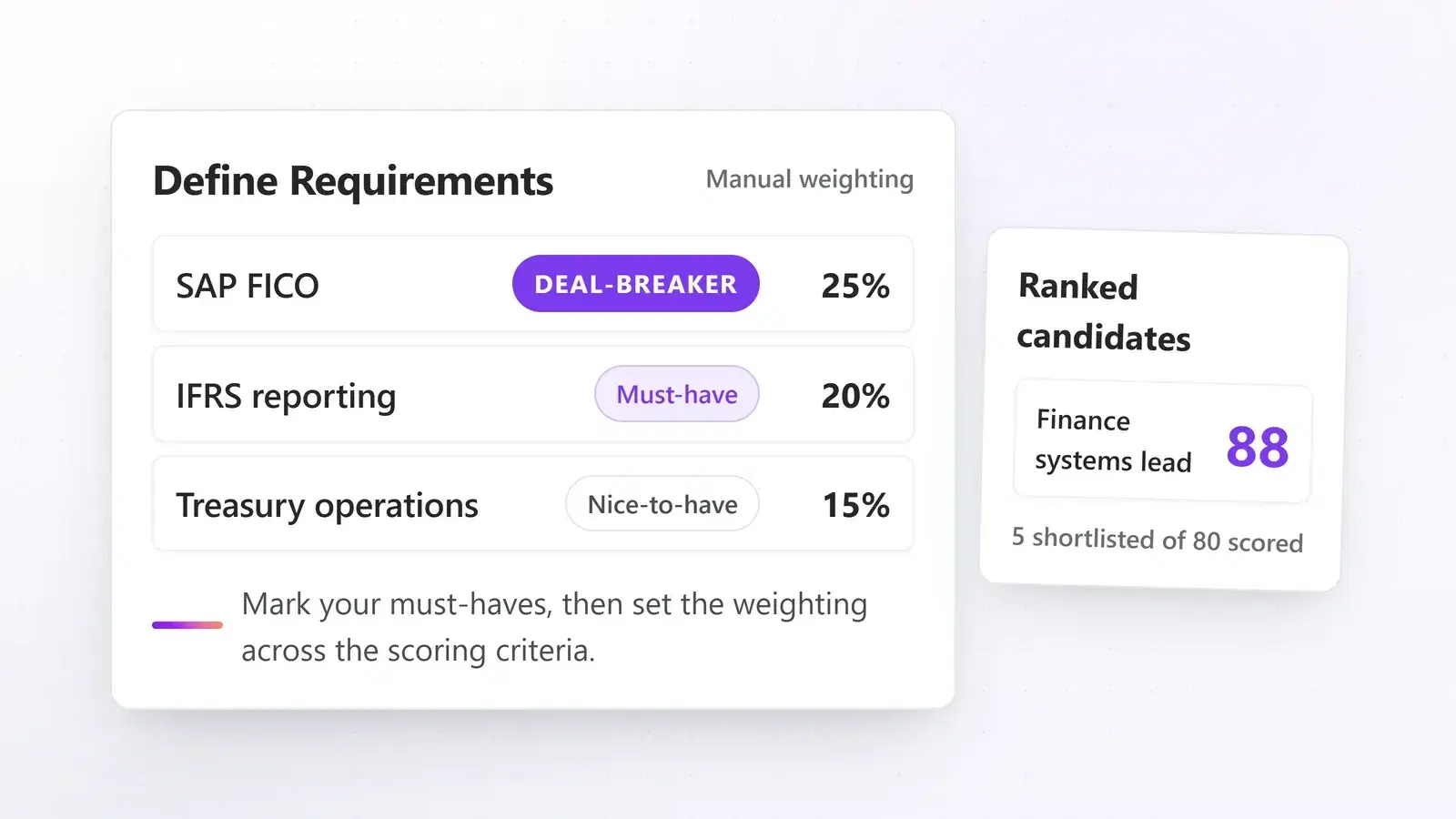
Si vous gérez les RH d’une petite entreprise, vous connaissez déjà la sensation. Un poste s’ouvre, les candidatures commencent à arriver, et vous voilà devant 80 CV que vous n’avez pas le temps de lire correctement. Le processus de recrutement ralentit. Les bons candidats n’ont pas de réponse assez vite. Et il vous reste trois autres dossiers à boucler avant la fin de la journée.
Le bon logiciel de présélection RH règle cela sans transformer votre recrutement en chantier informatique. Mais la plupart des outils du marché n’ont pas été conçus en pensant à vous. Ils ont été conçus pour les équipes d’acquisition de talents des grands groupes, avec un support informatique dédié et un budget logiciel à six chiffres. Ce guide détaille ce qu’il faut réellement vérifier avant de vous engager.
Pourquoi la plupart des logiciels de présélection RH n’ont pas été pensés pour les petites entreprises
Des outils grands comptes hors budget avant même la première connexion
La plupart des outils de présélection RH sont construits et tarifés pour de grandes équipes d’acquisition de talents, pas pour une fonction RH de deux ou trois personnes. Les plateformes grands comptes facturent en général des fonctionnalités que vous n’utiliserez jamais, exigent de longs délais de déploiement, et imposent des sièges et des postes actifs très au-delà de votre volume réel de recrutement. Payer 20 postes actifs quand vous en gérez quatre à la fois, ce n’est pas une bonne affaire. C’est du gaspillage.
La pression est réelle et mesurée : dans l’enquête Market Pulse d’ADP de novembre 2025, les dirigeants de petites entreprises citent la croissance de l’activité (26 %), le coût du travail (24 %) et le sourcing de talents (23 %) comme leurs trois premières préoccupations. Les outils qui ajoutent de la friction à un processus déjà tendu aggravent le troisième problème au lieu de le résoudre.
Ce que « conçu pour les petites équipes » veut dire en pratique
Un outil conçu pour les petites entreprises doit paraître simple dès le premier jour. Vous ne devriez avoir besoin ni d’une équipe informatique, ni d’un responsable d’intégration dédié, ni de trois semaines d’appels de configuration. Vous importez une description de poste, définissez vos critères, et commencez à examiner des candidats notés. Voilà la barre.
Si un éditeur vous demande de réserver plusieurs appels avant même de pouvoir essayer le produit, il a été conçu pour quelqu’un d’autre. Les meilleurs outils vous laissent faire passer un vrai poste dans le système le jour même de l’inscription.
Que doit faire, concrètement, un logiciel de présélection RH ?
Une notation automatique des CV au regard de vos exigences
Au cœur du sujet : un bon logiciel de présélection lit chaque CV entrant et le note au regard des exigences que vous avez définies pour un poste. Il produit une présélection classée : vous ouvrez une liste maîtrisable de candidats pertinents au lieu d’une pile de candidatures non filtrées.
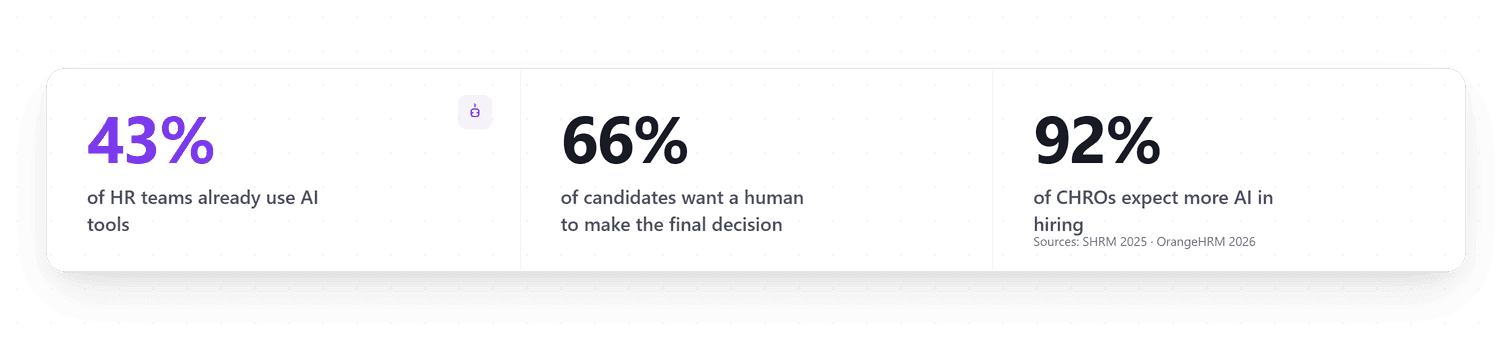
C’est désormais une pratique courante, pas une expérimentation : l’étude 2025 Talent Trends de la SHRM a mesuré 44 % des organisations utilisant déjà l’IA pour trier les CV, et 89 % des professionnels RH qui utilisent l’IA dans le recrutement déclarent qu’elle leur fait gagner du temps. Les heures libérées vont là où le logiciel ne peut pas suivre : les entretiens, les prises de références et la décision finale. Quand vous gérez plusieurs postes à la fois, une présélection notée qui vous attend à la place d’une boîte de réception brute change la forme de votre semaine.

Comment savoir si l’IA évalue correctement ?
C’est la question que la plupart des acheteurs oublient de poser, et la plus importante.
La notation transparente n’est pas négociable. Si le logiciel vous donne une liste classée mais ne peut pas expliquer pourquoi chacun est classé là où il est, vous avez un problème de visibilité. Vous ne pouvez pas faire confiance à une présélection que vous ne comprenez pas, et quand un responsable du recrutement conteste un candidat écarté, il vous faut une vraie réponse.
Les meilleurs outils de présélection montrent exactement quelles exigences chaque candidat satisfait, lesquelles lui manquent, et où quelque chose mérite un examen plus attentif, avec les preuves citées depuis le CV lui-même. L’IA fait le tri. Vous faites le recrutement, avec le raisonnement sous les yeux.
Les 4 vérifications à faire avant de vous engager avec un outil
1. La vitesse de mise en route : le jour même, pas dans un mois
Un outil de présélection pour petite entreprise doit être utilisable dans la journée qui suit l’inscription. Importer une description de poste, définir vos exigences, commencer à examiner des candidats. Tout délai supplémentaire est un signal fort que le produit n’a pas été conçu pour les équipes légères.
Méfiez-vous des éditeurs qui exigent un « appel d’intégration » avant de vous donner accès au tableau de bord. Ce n’est pas de l’accompagnement client. C’est un signal d’alerte.
2. Compatible avec votre organisation, avec ou sans ATS
Si vous utilisez déjà un ATS (logiciel de suivi des candidatures), vérifiez comment les candidats circuleront de lui vers l’outil de présélection et retour, et testez ce chemin pendant l’essai plutôt que de vous fier à un mur de logos d’intégrations. Le copier-coller manuel entre plateformes annule l’intérêt de l’automatisation et crée des trous où des candidats passent à la trappe.
Si vous n’avez pas d’ATS, ce n’est pas un problème. Beaucoup de petites équipes RH, aux États-Unis comme en Europe, construisent encore leur processus de recrutement à partir de zéro. Le bon outil fonctionne de manière autonome : vous devez pouvoir faire entrer les candidats d’où qu’ils arrivent (fichiers, e-mail, votre formulaire de candidature) et gérer tout le pipeline dans la plateforme de présélection, jusqu’à ce que vous soyez prêt pour plus d’infrastructure.
3. Une tarification alignée sur votre volume réel de recrutement
Avant de vous engager, vérifiez ce que comprend réellement l’offre d’entrée :
- Combien de postes actifs ?
- Combien de membres de l’équipe peuvent se connecter ?
- Les limites d’usage correspondent-elles à une équipe qui gère 3 à 5 postes, pas trente ?
- Y a-t-il des frais cachés pour exporter les données ou ajouter un deuxième utilisateur ?
- Pouvez-vous voir le coût d’une action IA avant de la lancer ?
Une règle simple : si la page de tarifs ne se comprend pas en deux minutes, le produit n’a probablement pas été pensé pour votre situation.
4. Une IA qui recommande, un humain qui décide
Les candidats acceptent globalement qu’un logiciel fasse le tri. Ils acceptent beaucoup moins qu’un logiciel décide de leur sort : Pew Research Center a mesuré que 66 % des Américains ne souhaiteraient même pas postuler chez un employeur qui utilise l’IA pour aider à prendre des décisions de recrutement.
Vérifiez donc comment l’outil structure la décision elle-même. Le schéma qui fonctionne : l’IA produit des scores et des classements à titre consultatif, le recruteur applique les décisions de présélection et de rejet avec les preuves sous les yeux, et chaque statut conserve la trace de la personne qui l’a appliqué, pour pouvoir reconstituer n’importe quelle décision plus tard. Si un candidat, un responsable du recrutement ou un régulateur demande « pourquoi ? », il vous faut un journal, pas un haussement d’épaules.
Comment Talentino s’inscrit dans ce modèle
Talentino est construit exactement autour de ce modèle. Voici ce qu’il fait quand vous y faites passer un poste :
- Des candidats depuis toutes vos sources : importez des CV en masse depuis votre appareil, collectez-les via votre propre formulaire de candidature, ou capturez-les depuis LinkedIn avec Talentino Scout, notre extension Chrome.
- Vos exigences depuis votre description de poste : collez la description et Talentino identifie les compétences, l’expérience et les qualifications à vérifier. Vous les ajustez, et marquez vos incontournables (les vrais critères rédhibitoires), avant de lancer quoi que ce soit.
- Une notation transparente : chaque exigence est notée pour chaque candidat, et chaque score s’accompagne des preuves citées depuis le CV, pour défendre n’importe quel classement sans rouvrir le document.
- Au-delà du CV, dans le dossier : Capturez un candidat depuis LinkedIn avec Talentino Scout et l’URL de son profil rejoint son dossier, à côté du CV. Ensuite, les informations que vous et votre équipe ajoutez sont conservées avec leur historique.
- La recherche en langage courant : interrogez votre vivier comme vous poseriez la question à un collègue (« développeur senior avec une expérience en banque ») et obtenez des résultats pertinents sur tous les postes que vous avez traités.
Les scores et les classements sont consultatifs : les décisions de présélection et de rejet s’appliquent depuis l’écran d’examen, preuves citées à l’appui, et chaque statut conserve la trace de la personne qui l’a appliqué.
L’essentiel
Le meilleur logiciel de présélection RH pour une petite entreprise n’est pas le plus puissant du marché. C’est celui qui correspond à votre volume réel de recrutement, fonctionne avec votre organisation existante, explique clairement son raisonnement, et structure les décisions pour qu’un humain les prenne avec les preuves sous les yeux.
En 2026, ces outils existent, et ils sont réellement bons. La clé est de savoir quoi vérifier avant de vous engager. Commencez gratuitement, sans carte bancaire.